Welcome to one of the most complete guides to identifying and preventing scams and fraud in phone calls, text messages, and phishing emails on the internet! I hope you learn something, or at very least, have a good refresher! If you know somebody who would benefit from this information, please feel free to share this content. It’s free and always will be! Here are the main sections of the article:
How to Identify and Prevent Scams and Fraud over the Phone
How to Identify and Prevent Scams and Fraud over Text Messages
How to Identify and Prevent Scams and Fraud in Emails
What Should I Do if I Think a Phone Call, Text, or Email is Suspicious?
Happy hunting, and let us know if you think of a way we can improve this article, or if you have a good example to share!
Introduction – Fraud and Identity Theft are Big Business
Javelin Strategy and Research estimates that, in 2020, identity fraud losses totaled $56 billion dollars. Identifying and preventing scams and fraud in phone calls, text messages, and email is an important part of 21st century life. The Federal Trade Commission (FTC) estimates that in 2020, 1.39 million Americans were victims of identity theft. If you incorporate fraud and other reports, this number swells to over 4.8 million reports. The scary part about these number is that they are likely higher due to people underreporting the theft of their identity, or not knowing their identity was stolen in the first place. When my identity was stolen in 2017, I was one of those people who did not report it to the FTC. Thanks to a Pennsylvania State Trooper who alerted me to the fraud, I was more concerned with closing out accounts that were created in my name and resolving fraudulent charges placed on my existing accounts.
Your Information (In This Case, Mine) Is Everywhere on the Internet
How did the criminals get my information? The answer is, who knows? I had recently changed my address to register a motor vehicle, so the bad actors could have stolen the information from the Department of Motor Vehicles. Or they could have stolen my information in the Target data breach of 2013. Or they could have purchased my personal information on the dark web after it was stolen in the Office of Personnel Management’s data breach in 2015 as a result of my previous service in the Federal Government. The list goes on.
Like it or not, your information is somewhere on the internet. Maybe you used your credit card to sign your child up for summer camp, or you entered your Social Security Number and other personal information into an online mortgage application. This information is now out of your control, and there really isn’t much you can do about it. That’s why you should only do business with reputable companies. Reputable companies want to protect your information because it’s in their business’ best interest to protect and retain customers. Sure, a sketchy website can get you a killer deal on Microsoft Office, or, more likely, you just paid $25 for a fake license. I digress, because this article isn’t about identifying reputable companies. It’s about identifying scam and fraud when it comes to you, because the real headline is staggering.
In 2020, the majority of fraud victims gave away their information to cybercriminals.
The Majority of Fraud Comes from People Who Interacted with Their Attacker
Remember that $56 billion in fraud loss I talked about at the beginning? The real problem with this estimate is that only $13 billion was stolen in schemes like mine, where I have no idea where or how the criminals obtained my information. The other $43 billion came from people who had DIRECT contact with the attacker. This means they gave out information over the phone, exchanged emails, or traded text messages with the person who would use their information to commit fraud. Yes, you read that correctly, over 75% of people who were victimized by fraud or other cybercrimes spoke, texted, or emailed their attacker.
This leads us to the bulk of this article, which is how to identify and prevent yourself from becoming a target over the phone, via text, or through your email inbox.
How to Identify and Prevent Scams and Fraud over the Phone
There are a lot of jokes going around circa fall 2021 about suspicious parties contacting you regarding your car’s extended warranty. Even people who have never owned a car receive these calls. Except it’s only partly a joke. It’s a fairly safe bet that it was initially a successful scheme, caught on in popularity due to its success, and oversaturated the fraud-scheme market to the point of becoming pop-culture. Now that people know the jig is up, cybercriminals will invent a new problem to alert you to.
Of all the fraud schemes that people get trapped into, phone fraud confuses me the most. In theory, it should be fairly simple to prevent. If you haven’t started doing this already, stop answering your phone if you don’t know who is calling. Most cell phones will show the number of the incoming caller. If it isn’t a number you recognize, don’t answer the call. If it is important, or real, the caller will leave a message.
When you check your voicemail, listen to see if what the person or recording is saying makes sense. Listen to see what organization they represent or are pretending to represent. If you’ve never bought a couch from Sam Levitz furniture, then why give them your personal or financial information over the phone?
If someone attempts to contact you regarding a legal matter, or you owe money to a debt-collector, or some other seemingly legitimate reason, make sure you don’t commit to anything or give any information over the phone. Ask for as much information as you can. If they’re phony, their story will start to unravel. Better yet, ask where you can contact them and cross-reference the information against the internet. Anybody legitimately looking for you or your money has a phone number or email address you can look up. To sum it all up, here are some quick easy steps to identify and prevent scams and fraud over the phone:
- If you don’t recognize the phone number, do not answer the phone. Let the caller leave a voicemail.
- When listening to the voicemail, see if it makes sense. Are they from a company you have recently done business with? Does their request line-up with what you have been doing on the internet and in-person?
- Cross-reference any contact information left in the voicemail with an internet search. Does the contact information match? Did they leave a return phone number that is based in a different country than where they do business? If somebody from Microsoft is calling from a number that starts with +54, I’d be pretty suspicious. +54 is the country code for Argentina. All American numbers start with +1, so an American number would look like +1(555)555-0000.
- If you do answer the phone, ask as many questions as necessary to verify who you are speaking with and what they want. Ask if there is a phone number that you can call back. If they run out of answers, sound suspicious, or get frustrated that you aren’t giving away your information, hang up. Those are serious red flags, and you should either hang-up immediately or proceed with caution.
How to Identify and Prevent Scams and Fraud over Text Messages
Recently, I received the following text message:

I have to hand it to whoever sent this, it’s actually pretty good – because it is asking me to verify the shipping address. But it does have some critical mistakes that were a dead give-away. Let’s run through them.
- Normally, you need to order something for shipping tracking. I didn’t order anything. If I were to order something, I could check its status on UPS, USPS, FedEx, Amazon, or wherever I ordered it from.
- Most places will offer you options to opt-out or opt-in to receive text message updates. This did neither.
- Slight grammatical errors. I would like to think that if a living, breathing person with a strong command of the English language wrote this (or automated it, to be accurate), they would not have said “tracing number,” when they meant “tracking number.”
- Every single time I’ve ordered something off of the internet, or otherwise, I had to include an address of WHERE to ship the item. I don’t know if I’ve ever had to go back and verify the shipping address. This one is more nuanced, but because of the next step, I knew it was fraud.
- Instead of clicking the link in the text message, I decided to go directly to neitherimport.com via my web browser to see what it was all about. It turns out, it’s not about anything, because the page didn’t exist:

So, to boil down the above list into a shorter, more condensed list:
- Text messages should reflect your recent online activity. If you didn’t sign-up for mobile updates, and the text doesn’t state that it’s a from a business you recently interacted with, it’s probably a scam.
- Do not open links in an unexpected text message. Ever. Either use the mobile app for that company or manually enter the web address into your search bar.
- Be on the lookout for grammatical mistakes, or for texts asking you to take actions that don’t make sense, such as “checking” a shipping address.
How to Identify and Prevent Scams and Fraud in Emails
Identifying scam and fraud in emails is no more difficult than identifying phone calls or text messages with ill-intent. You don’t even need to be a super-detective. In an email, there is often a lot more information that you can use to snuff out potential pitfalls.
First, it may be helpful to understand the ultimate goal of scam or fraud emails. They’re called phishing emails because they are sent to a large amount of people with the hope that a handful of people will (and often, do) fall prey to the scheme. Just like regular fishing, you drop a line and wait for a bite. The more targeted and personalized the email is to the recipient, the more dangerous it becomes. An emailed hand-crafted to an individual using their name and other specific details is considered a spear-phishing attack, like hunting for a certain type of fish using its favorite bait (a seal to attract a great white shark?). The ultimate goal of these emails is to get you to 1. Open an attachment, or more commonly, 2. click on a link in the email. Unless you trust the source of the email, you should do neither of these things. The reason cybercriminals want you to open an attachment or click on a link is so that they can do one of the following:
- Install a malicious program (virus) on your computer. This program will either record your activity (web activity and keystrokes, like when you type in your username and password) and report it back to the cybercriminal, turn your computer into a slave that performs background tasks that serve the cybercriminal’s purpose, lock you out of your computer and demand a ransom, or attempt to remotely gain access to your computer’s files and information in the hope of stealing your personal information.
- Click on a link in the email. The link in the email will either install a program designed to fulfill one of the functions above, or take you to a fake webpage. Can you guess what the fake webpage is designed to do? That’s right, capture your login information or personal information.
Keep in mind that during most of the above, expect where you actually get held for ransom, you have no idea you’re being exploited until it’s too late. Cybercriminals have become incredibly sophisticated and can make the above processes happen in the background and can even evade or disable antivirus software. That’s why it’s important to spot these emails before you take action on them.
Recently, I had somebody ask me if a particular email was real. The answer was a resounding “no.” I had them forward me the email so that I can show you exactly what to look for. Throughout this exercise, I’ll be referencing the email below and its many problems. If it feels like I’m piling-on, stay patient, because a more well-crafted email scam could fix a lot of these problems, but still have one or two inconsistencies that give it away. I’ve yet to see a perfectly crafted scam or fraud email, but that doesn’t mean they don’t exist. Let’s take a look:

Here are the problems, or at least as many as I could identify at first-glance:
- There isn’t a single Microsoft or Windows logo anywhere in the email.
- The email comes from “Windows Defender Order.” But look closely, it actually comes from microsoftsubscription97523@gmail.com. This alone is enough to tell you that it is a scam. Microsoft doesn’t send emails from Gmail. Microsoft emails come from a domain that has Microsoft in it, like example@Microsoft.com. It could be support@microsoft.com, noreply@microsoft.com, or even microsoftstore@microsoftstoreemail.com, but it’s never going to come from Gmail. In addition, an email about billing should come from a billing address or the Microsoft store. I just checked an email confirmation from a legitimate Microsoft purchase, and it came from stre@microsoft.com, and they made sure to note that it’s a notification only email and included a link to their support page.
- Windows Defender is a FREE product that is included with every purchase of a Microsoft Windows operating system. In fact, Windows Defender is an old product, because it is now known by Microsoft Defender Antivirus, and can be found in Windows Security. In short, they should never be asking for money.
- The email is addressed to “Dear Customer.” I just checked real emails I received from Microsoft. It’s just sent to my email address, no terms of affection.
- When I hovered over the “Invoice Details” button, the website it would navigate to was www.example.com. So, not Microsoft.
- Bad grammar is always a dead giveaway. “Have any question” is inconsistent with its pluralization (any question-s), it’s capitalization when compared to the first heading (Microsoft Accounts), and it’s missing a question mark. In addition, the paragraph below “Have any question” contains numerous grammatical errors that a company like Microsoft wouldn’t let get past their proof-readers. I also found it odd that they specified the client service supervisor was a “he.”
- The paragraphs of text below “Have any question” looks plain funny. It’s not the font that I see on most Microsoft webpages or emails. Microsoft has a corporate brand and the fonts they use are part of that brand. In additions, the paragraphs are funny, center-aligned, and leave random strings of words hanging below the paragraph, which looks sloppy.
- The false sense of urgency is common in emails like this, which states, “Please communicate with our client service supervisor within 48 of receiving this email.” If this is a notice for an automated renewal notice, there wouldn’t be a time-sensitive need. The company would send you a notice a few weeks or a month in advance, and then a receipt once your service was actually renewed. Additionally, you should be able to cancel your subscription online, without having to contact anybody over the phone, like the email requests.
- It says Copyright 2018 Microsoft Accounts. It’s soon to be 2022.
- I wasn’t able to view the original email, only the forwarded version, but I’m guessing the “unsubscribe” link was inactive there, too.
In case that’s too much, I’ve broken down the common elements of a scam or fraud-inducing email below:
- The email comes from a suspicious sender.
- The contents of the email reference internet activity that does not match what you have been recently doing. For example, you probably didn’t sign-up for an online sports betting service or purchase a subscription for a topic you aren’t interested in.
- The attacker will mention an urgent problem, like viruses on your computer or an expiring warranty. It may or may not specify a time sensitivity, like 48 hours in our example email.
- The email will require you to download an attachment or follow a hyperlink.
- If you hover your mouse over a hyperlink (DO NOT CLICK IT!), the web address of the hyperlink should appear somewhere on your screen. Try it on one of the hyperlinks in this article! In iOS (iPhone), you can use the link preview feature, described here by Khamosh Pathak. The target web address should match the entity who sent you the email. For example, an email from Apple shouldn’t take you to anything other than Apple website. A Microsoft email that redirects to www.example.com is certainly a scam.
- Grammatical and/or spelling mistakes.
- Requesting money for free services.
- Requesting money and then promising to pay it back later or promising to pay it back with too-good-to-be-true returns.
- They come from a CEO or person of power that shows unusual interest in you. I recently had this happen to me on LinkedIn, where a person with CEO in their job title tried to offer me a job making $150,000/year without an interview or a resume, and instead wanted personal information to “start the hiring process.”
In addition, the FTC published a list of common tactics that largely mirrors my own or can be found in the real-life example above. It reads:
“Phishing emails and text messages often tell a story to trick you into clicking on a link or opening an attachment. They may:
- say they’ve noticed some suspicious activity or log-in attempts
- claim there’s a problem with your account or your payment information
- say you must confirm some personal information
- include a fake invoice
- want you to click on a link to make a payment
- say you’re eligible to register for a government refund
- offer a coupon for free stuff”
Now that you have the tools to identify scam or fraud phone calls, text messages, and emails, let’s talk about what to do next.
What Should I Do if I Think a Phone Call, Text, or Email is Suspicious?
While I tried to cover this above, it bears repeating. Don’t take any action on anything that seems suspicious! Don’t click on hyperlinks, don’t download attachments, and don’t give out any information over the phone. If there is a way to report suspicious emails, like Gmail’s built-in functionality when you click the three dots, then report-and-block the sender is a great policy.
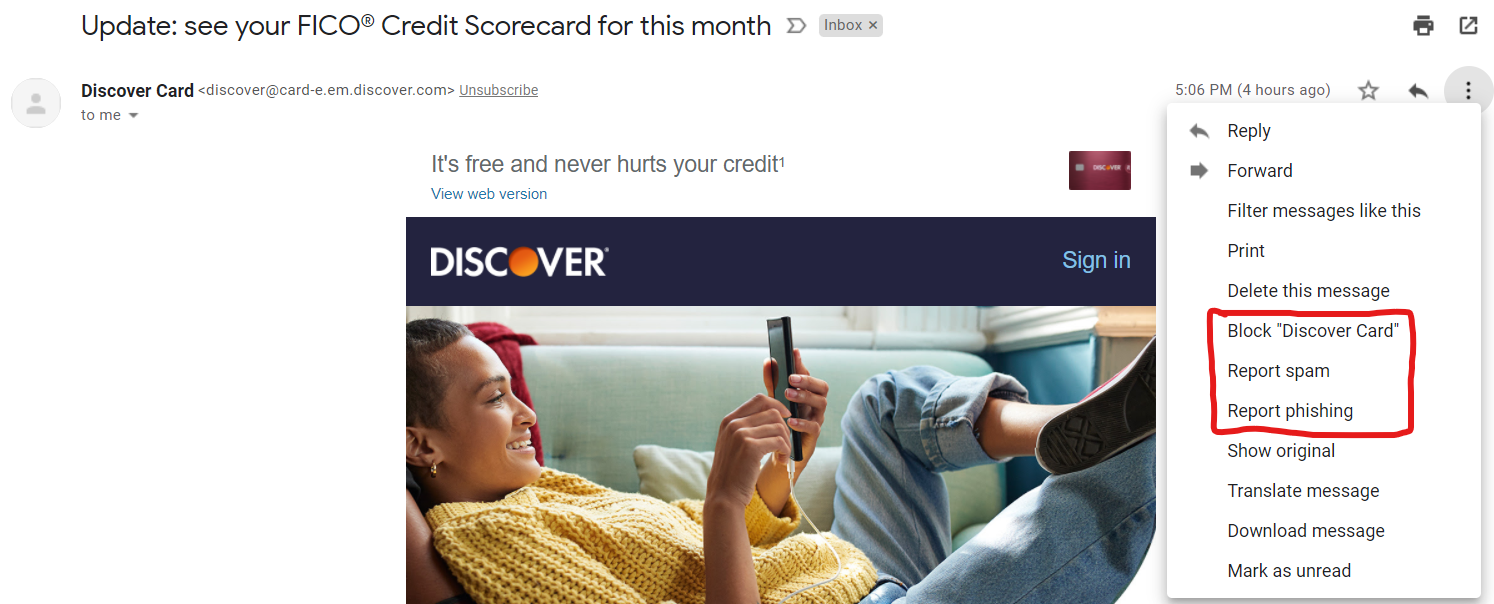
I looked it up, and as of now, the only way to report spam or phishing using Apple’s integrated mail app in iOS is to forward the email to reportphishing@apple.com. Hopefully, Apple will integrate a more seamless way to report suspicious emails in the future as mobile use increases. Also, you should forward the email to the FTC’s Anti-Phishing Working Group at reportphishing@apwg.org. Finally, Report the phishing attack to the FTC at ReportFraud.ftc.gov.
If you receive a suspicious text message, one of the only ways to report it is to forward it to SPAM (7726).
Whew! I think that just about covers it for now. At very least, if you’ve made it this far, then you’ve had a solid refresher on identifying scams and fraud via phone calls, text messages, and email. Maybe you’ve even learned a thing a two!
As always, we’d love to hear your comments, either on the post, or via our contact form.